
Yes! I'd like to be contacted to schedule a consultation!
If you’re a landscaper, improving your SEO might not be at the top of your priority list. Landscaping is a demanding job that might not leave a lot of time to plan and execute an SEO strategy.
However, these days, SEO is a must for small businesses. When you’re ready to start optimizing your online presence, you need to know how to do it right.
In this blog, LinkNow will share some of the most common SEO mistakes we see and how you can avoid or correct them. We’ll look at issues with keywords, images, and neglecting local SEO, but first, let’s briefly discuss what search engines are trying to do and how you can align yourself with their goals.
A search engine’s objective, first and foremost, is to get a user to the information they searched for as quickly as possible. Pages that best fulfill this objective are the ones that will rank the highest for a specific search.
To best respond to a user’s search, pages need to be:
Achieving all five requires a steady commitment to a well-crafted strategy. When you’re ready to start working toward a solid SEO strategy, we recommend you avoid the following common mistakes.
You may have heard of keywords before. The term gets thrown around a lot in digital marketing, but what are keywords? Essentially, keywords are the words or phrases that users search for on a search engine. Identifying keywords on a page is how a search engine best captures its topic and knows whether it matches a specific search.
When someone searches for the keyword you’re targeting, say “landscaper in Los Angeles,” on Google, you want your page to appear as high as possible in the search results.
There are two major issues that people often run into with keywords:
Let’s take a closer look.
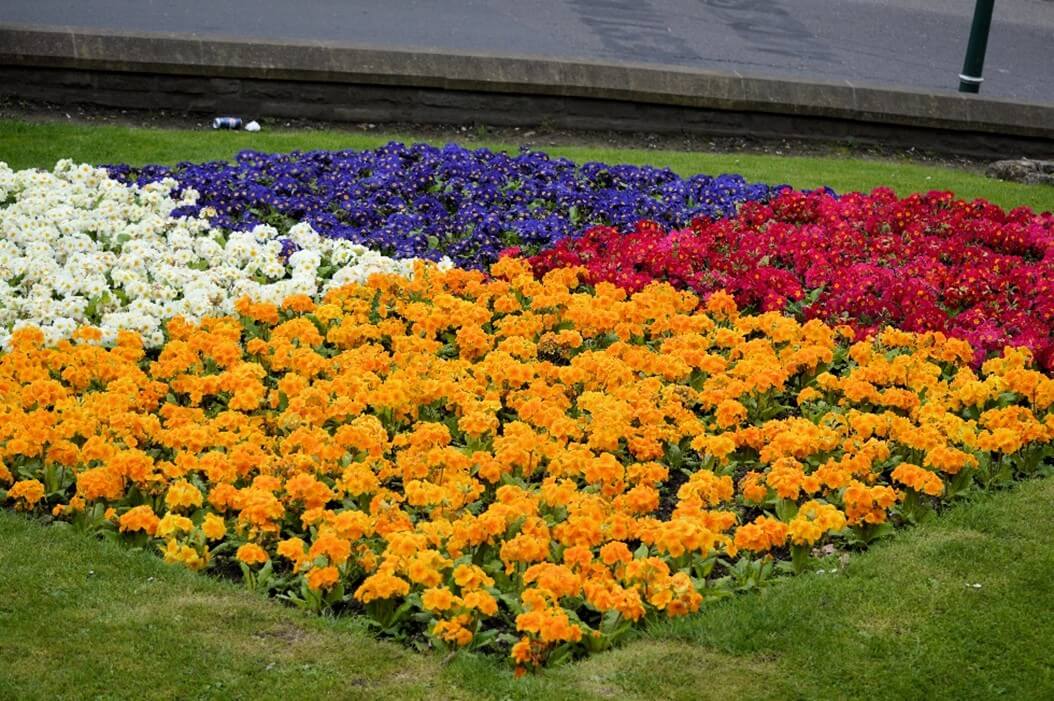
Imagine a beautiful, freshly planted flower bed. It’s well-ordered and spacious, with a cohesive color scheme and many different species working together. Now imagine there’s a single type of flower crammed in everywhere, all within inches of each other. There’s little rest for the eye and diminished visual impact.
Keywords on your web pages work similarly. If a page goes out of its way to mention the same word or phrase multiple times throughout the page, that’s called keyword stuffing. Keyword stuffing creates unnatural language, and a reader or a web crawler will take one look and assume the page was written by someone without enough knowledge to effectively speak to the topic.
Keyword stuffing is often used by people who assume that if a search engine sees a phrase frequently, it will assume the page is more relevant to that topic than a page that mentions the phrase only a few times. This may have been true at one point, but it hasn’t worked for many years, and search engines actively punish the approach.
Let’s imagine a page on “Landscape Design in Dallas.” A well-written, expert page might discuss what types of grass, trees, and plants would work best in the climate or what materials could be used to create a walkway.
However, a poorly researched page might try to make up for its lack of expertise and information by using the keyword “Landscape Design in Dallas” frequently throughout the page. This tends to produce very unnatural sentences, such as:
“If you want landscape design in Dallas, look to our landscape design in Dallas experts. We have the training and expertise to meet all your landscape design in Dallas needs.”
As you can tell, the writer seems to be floundering and lacking anything valuable to say.
Remember, search engines want to prioritize content that gets a user to the information they want as quickly as possible. Keyword stuffing makes the page seem, at best, difficult and unnatural to read and, at worst, a scam page trying to rank highly. At this point, search engines actively look for keyword stuffing and punish a web page that engages in the practice.
Search engines aren’t looking for keyword stuffing, so what are they looking for? The answer is keyword clusters. Search engines want to see a group of relevant secondary keywords surrounding the primary one.
For our “Landscape Design in Dallas” page, a search engine would look to see if subsequent subheaders contain keywords such as tree services, garden installation, hardscaping, or maybe a few species of flowers. If those secondary keywords in subheaders are followed by body text that contains even more keywords related to the secondary one, that’s another point in your favor.
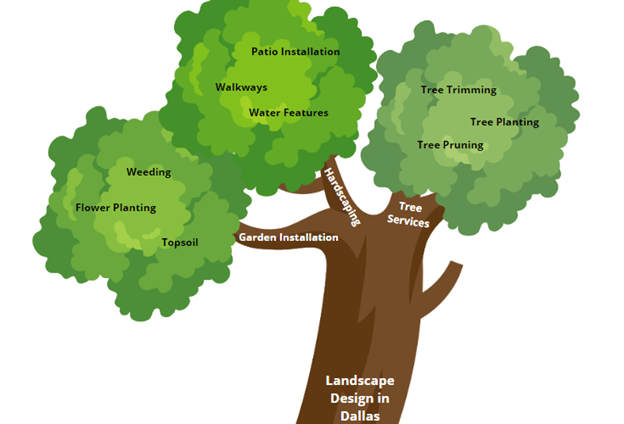
Think of your page like a tree: the primary keyword is the trunk, and every limb that branches out contains a new keyword connected to the one before it. The fuller the tree, the more likely a search engine will look at your page and judge it as an informational, useful result for a user looking for landscape design in Dallas.
Also like caring for a tree, there’s no substitute for time and attention to detail when improving your content.
When you plant flowers, you need to leave enough space so they don’t crowd each other out when competing for nutrients. Your pages work similarly. There are only so many searches to go around, and if two pages are in competition, then they’ll be taking each other’s visits.
Keyword cannibalization refers to when two pages on your website target the same keyword. The best way to prevent keyword cannibalization is through thorough site planning. For instance, if you know you have a landing page on “Tree Trimming in Orlando,” you don’t want your general service page on “Tree Trimming” to constantly mention that you work in Orlando. Likewise, you don’t want your “Tree Services” page to constantly mention your tree trimming services. Once or twice is fine when appropriate, but not throughout the whole page.
Fixing keyword cannibalization is tricky and time-consuming. There are tools you can use to see if any of your pages are competing, but that requires accessing and using the tools and then either deleting or rewriting a page once the issue is identified.
That’s why, at LinkNow, we prefer the preventative method. Our in-house Organic research and content writing team tracks and double-checks content being added, making sure it isn’t in competition with existing content.
For landscapers, images are one of the best tools for promoting your business. A good photograph can quickly and impressively showcase your work and is often an excellent tool for instantly drawing in a reader and making them want to learn more. With that said, there are a few mistakes you can make that will quickly lead to this effective advertising method hurting your rankings.
Those mistakes are:
Let’s take a more in-depth look at each.
Broken images are simply images that the page can’t find. The reason for a broken image could be as simple as a mistake when linking the image or a file incompatibility, but there are also more technical issues.

In your website’s code, a specific tag saves a spot on the webpage for an image, and then a pathway specifies the image to be loaded in that spot. If an image no longer exists at the end of the pathway, then the webpage can’t load it in the designated spot. Similarly, if the image name has changed from the one in the pathway or if it has become corrupted, then the webpage won’t be able to find and display the image.
In addition to losing out on a valuable advertising opportunity, broken images signal a lack of professionalism and dedication to maintaining a website. Users are more likely to leave a webpage quickly if it has a broken image. Similarly, web crawlers judge broken images as a sign that a page isn’t being maintained and could very well contain outdated information.
The first step in fixing broken images is noticing them. There are online tools that can scan your website for broken images and alert you to their presence. Otherwise, you’re relying on a manual site audit or just noticing them as you periodically click through your site.
Once you’ve identified broken images, you must diagnose the problem. If the image no longer exists in its original location, you need to either find a new image or create a new location for it. If it does still exist, then you need to go through your code to figure out where there’s a mistake in your specified pathway.
Overall, it requires a lot of technical expertise. Not everyone is comfortable with digging through or altering code. Here at LinkNow, we monitor our clients’ sites for broken images and have a dedicated website design team that can solve this very problem.
Alt text is a tag attached to an image that describes its contents. It might seem like an added hassle since the photo is right there, but it’s crucial to your on-page SEO.
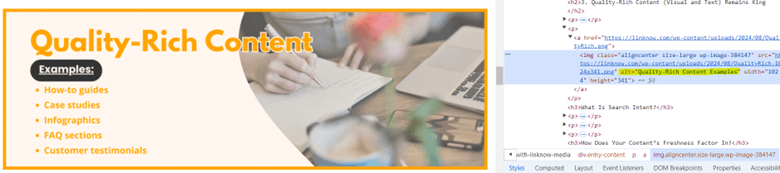
Alt text has three key uses:
The biggest issue is having no alt text—web crawlers can’t tell what your image shows and your page isn’t accessible. However, even if you have it, there are significant differences between good and bad alt text.
Let’s say you have a photograph for a page on “Walkway Installations” of a stone walkway in a backyard passing between two trees. You could have vague alt text, such as “A backyard.” The alt text exists but says very little. Furthermore, the keyword “backyard” is only tangentially related to the page's topic.

You can also err by being specific but not on the topic at hand. For example, you could make the alt text, “Two oak trees in a backyard.” The alt text contains specific information, but it’s hard to understand why this image is relevant to a page on “Walkway Installations.”
Simple and non-specific alt text, such as “A walkway in a backyard,” is better but not as good as specific alt text, especially for accessibility purposes. The best option might be something more descriptive with a more specific keyword, like “A grey flagstone walkway winding through trees in a backyard.” The web crawler will know that this is a relevant image and that it expands on the page’s topic.
A reader with impaired vision will also be able to get a clearer idea of the image. This alt text is even better if the image is close to a section on “Walkway Materials” that includes flagstones.
A few other tips for effective alt text include:
The final error you can make with your images is using ones with large file sizes. The problem here is simple: Large files slow down your page’s load time. Load time is a critical factor in SEO. Users are more likely to leave a page if it takes a while to load—especially if they’re on a mobile device since these tend to load slower.
Search engines punish slow load times for exactly this reason, but you get an added punishment since a slow-loading page delays the web crawler. The web crawler will look at as many of your pages as it can in a given timeframe and then move on, so slow pages mean fewer will get indexed.
The simple fix is to shrink image file sizes or compress images. However, you want to make sure you’re not hurting your image quality since a pixelated image will also be seen as unprofessional, leading to users leaving your page. At LinkNow, we pay close attention to these factors when adding photos to a client’s site.
Local SEO is an essential part of your digital marketing. Landscaping businesses are, by nature, local. If you’re based in Pennsylvania, you’re not about to take a job in Texas.
People who need a landscaper will likely be looking for someone nearby who can arrive soon and knows the local climate. They might search for something like “landscaper near me,” “landscaper in my area,” or “landscaper in Pittsburgh.” Those searches all have what’s referred to as local intent. Due to the local nature of the industry, search engines will often interpret a search of simply “landscaper” as having local intent.
Google answers searches with local intent differently than it would general searches. If you’ve seen a few businesses show up at the top of the results page beside a map, that’s a listing of nearby businesses directly responding to the local search.
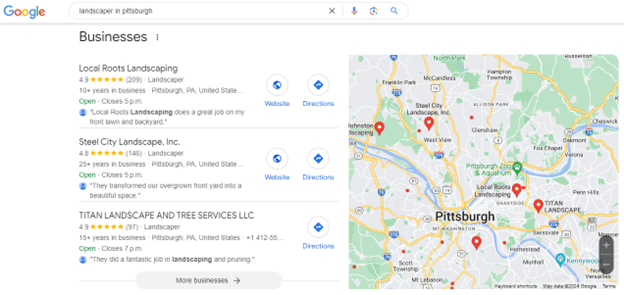
Crucially, you can only show up on that tab if you have a Google Business Profile. A Google Business Profile tells Google that your business is real and gives it a location that Google can display.
Google Business Profiles are the most important local listing you can set up—it’s the first listing LinkNow signs up our clients for—but there are others.
Some other local listings you can join include:
We try to get our clients set up on a handful of directories early. The more local listings you show up on, the more reputable your business will appear, and the more likely you’ll appear high on searches with local intent.
We understand that landscaping can take up a lot of your time, and your online presence might be the last thing you’re thinking about. When you want to grow your business online with the help of a professional digital marketing company, contact LinkNow.
We provide website hosting and design, content creation, local SEO, and online marketing to over 10,000 small businesses across North America, including many landscapers. Schedule a free call with a LinkNow rep to get started.