
Overview
Google Business Profile suspensions can be confusing, stressful, and costly for small business owners who rely on local search visibility. This LinkNow guide explains why suspensions happen, what steps to take after one occurs, and how to keep your profile compliant with Google’s guidelines.
Highlights
- • What Is a Google Business Profile Suspension?
- • Why Does Google Suspend Business Profiles?
- • What Should You Do If Your Google Business Profile Is Suspended?
- • Suspended vs. Disabled: What’s the Difference?
- • Special Cases Small Business Owners Should Know
- • Google Suspension Frequently Asked Questions
Introduction
One day, your business is showing up on Google Search and Maps. Customers can call, click, read reviews, request directions, and decide whether you are the right company for the job. Then suddenly, your profile is suspended, and everything feels unclear.
For small business owners, that can be incredibly frustrating. Google is often one of the first places people go when they need a local business or service provider. When your profile is no longer working the way it should, it can feel like your digital front door has been locked without much warning.
The good news is that a suspension doesn’t always mean your business is gone from Google forever. In most cases, it just means Google needs to verify that your profile is accurate and follows its guidelines.
This guide breaks down what Google Business Profile suspensions mean, why they happen, what steps to take after a suspension, and how to avoid common mistakes that can make the situation worse. By the end, you’ll have a clearer understanding of what Google is looking for and how to protect one of your most valuable local marketing assets.
What Is a Google Business Profile Suspension?

A Google Business Profile (GBP) suspension occurs when Google limits or removes a business listing because it believes the profile may not comply with its guidelines. Depending on the situation, your profile may stop appearing publicly on Google Search and Google Maps, or you may lose the ability to manage it until the issue is resolved.
In simpler terms, Google is putting your profile on pause because something about your listing raised a red flag.
That doesn’t always mean your business did something intentionally wrong. Sometimes suspensions happen because of inconsistent information, outdated details, duplicate listings, or incorrect categories. Really, a suspension can occur due to any of a number of changes that make Google question whether the profile accurately represents a real business, not because they’ve determined it isn’t.
Why Google Suspensions Matter for Small Businesses
Even if it doesn’t mean you’ve done anything intentionally wrong, a suspended profile can cause real problems fast.
For many local businesses, a Google Business Profile is one of the main ways customers find them. Someone searching for a plumber nearby, a dentist open today, a landscaper in their town, or a restaurant close to home may never make it past Google Search or Google Maps. When your profile disappears, your business can lose visibility at the exact moment potential customers are ready to call.
A suspension can lead to:
- • Fewer phone calls from Google Search and Maps
- • Fewer direction requests from nearby customers
- • Less website traffic from people viewing your profile
- • Lost visibility in local search results and map listings
- • Lower trust from customers who expect to find your business on Google
- • Possible disruption to review visibility or profile management
Even if your website is still online, customers may wonder what happened if they can no longer find your Google Business Profile. That missing listing can create doubt, especially for people who have never worked with your company before.
Why Does Google Suspend Business Profiles?
Google’s main goal is to keep Search and Maps useful, accurate, and safe for people looking for local businesses. That means every Google Business Profile needs to represent a real business clearly and honestly.
For small business owners, most suspensions come down to one basic issue: Google saw something that made the profile look inaccurate, misleading, suspicious, or ineligible. That doesn’t always mean anyone tried to break the rules. Sometimes, honest mistakes trigger problems too.
Here are some of the most common issues Google flags:
Your Business Name Doesn’t Match Your Real-World Name
Your Google Business Profile name should match the name customers know in real life.

That means your profile name should reflect your signage, website, business cards, invoices, legal documents, and other official branding. Adding extra keywords, city names, services, or promotional language can create problems if those words are not part of your actual business name.
As an extreme example, “Smith Plumbing” is safer than “Smith Plumbing Best Emergency Water Heater Repair Dallas.”
The second version might sound like you’re capturing more searches, but it also looks like keyword stuffing. Google specifically says business names should reflect the real-world name used consistently by the business. Google also says unnecessary information in a business name is not permitted and could lead to suspension.
Common risky additions include:
- • Service keywords
- • City names
- • Taglines
- • Special offers
- • “Near me” phrases
- • Extra locations
- • Claims like “best,” “top-rated,” or “#1”
A business name is not the place to squeeze in every keyword you want to rank for. Use your description, services, posts, website, and reviews to support those details instead.
Your Address Is Inaccurate or Misleading
Address problems are another common reason GBPs run into trouble.
Google wants customers to understand where your business is located or, in the case of service-area businesses, where your company serves customers. Problems can happen when the address on the profile does not accurately reflect how the business operates.
This can include:
- • Using a P.O. box
- • Listing a virtual office
- • Showing an address where customers cannot actually visit
- • Using an employee’s home address incorrectly
- • Displaying a home address when the business should be set up as a service-area business
- • Listing an office that is not staffed during stated business hours
For example, a plumbing company that visits customers at their homes may not need to show a storefront address. A retail shop, on the other hand, should use the actual location that customers can visit.
Google allows both businesses that welcome customers at their physical locations and businesses that travel to customers to create Business Profiles. However, the profile details need to match that business model.
You Created Multiple Profiles for the Same Business
More profiles don’t mean more visibility.
In many cases, duplicate Google Business Profiles create confusion. Google generally wants one profile for one business at one location. If multiple profiles represent the same business, Google may not know which one to trust.
Duplicate profiles can happen when:
- • A previous owner created a profile years ago.
- • An old marketing company made another listing.
- • A business moved and created a new profile instead of updating the old one.
- • Staff members accidentally created separate profiles.
- • A business tried to make separate listings for different services.
Google provides specific guidance for resolving duplicate profiles and ownership issues. It also explains that separate profiles at the same address are only appropriate when they represent distinct eligible businesses with clear differences, such as separate names and signage.
For most small businesses, the safest approach is simple: one real business, one accurate profile.
Your Business Category Doesn’t Match What You Actually Do
Categories help Google understand what your business is. They should describe your core business, not every service you wish to rank for.
A roofing company, for example, should not add unrelated categories just to show up for searches about pest control, landscaping, or remodeling. Even if the business occasionally performs related work, categories should still reflect the main business clearly.
Google recommends using as few categories as possible to describe your overall core business. A good category choice helps Google trust your profile. A messy or exaggerated category list can do the opposite.
Your Business Isn’t Eligible for a Google Business Profile
Not every operation qualifies for a Google Business Profile.
In general, eligible businesses need to either have a physical location customers can visit, or they need to travel to customers where they are. Google’s guidelines say businesses with a physical location or those that visit customers can create a Business Profile. That means some business models may run into eligibility issues, especially if there’s no direct customer interaction.
Examples that may create problems include:
- • Online-only businesses with no in-person customer contact
- • Lead-generation listings that do not represent a real local business
- • Rental or for-sale properties listed as businesses
- • Events, classes, or meetings held at temporary locations
- • Businesses using addresses where they do not actually operate
This is where many owners get frustrated. A company can be real and still either not be eligible or have a profile set up in a way that makes it seem ineligible.
Your Website, Phone Number, or Business Details Raise Trust Issues
Customers look for consistency. Google does too. If your Business Profile says one thing, your website says another, and your business documents say something else, the profile may look suspicious.
Trust issues can come from:
- • A disconnected phone number
- • A phone number that belongs to another business
- • A forwarding number that creates confusion
- • A website with a different business name
- • A website that lists a different address
- • A profile category that doesn’t match website services
- • Business licenses, signage, and profile details that don’t line up
This is often called NAP consistency, which stands for name, address, and phone number. Small inconsistencies may seem harmless, but they can make Google less confident in your profile.
A good rule of thumb: Your Google Business Profile, website contact page, business license, signage, and major directory listings should all tell the same story.
You Made Too Many Major Edits at Once
Updating your profile isn’t a bad thing. In fact, keeping business information current is important. However, major changes can sometimes trigger additional review, especially when several important details change at the same time.
These edits may receive closer attention:
- • Business name changes
- • Address changes
- • Phone number changes
- • Website changes
- • Primary category changes
- • Ownership changes
- • Large service area changes
Google doesn’t say that every major edit will cause a suspension. Business owners move, rebrand, change phone systems, and update websites all the time. Still, when a profile suddenly changes in several ways, Google may need to verify that the business is still legitimate and accurately represented.
Before making major updates, it helps to make sure your website, documents, signage, and profile details are aligned.
Your Content Violates Google’s Rules
Your Business Profile is not only made up of your name, address, and phone number. Photos, videos, posts, descriptions, products, services, and other content also matter.
Google’s Business Profile content policies say submitted content must follow prohibited and restricted content rules. These policies apply to text, photos, and videos, and Google says business owners are responsible for making sure posts comply with applicable laws and regulations.
Content problems may include:
- • Spammy business descriptions
- • Misleading claims
- • Inappropriate images
- • Restricted products or services
- • Fake engagement
- • Offensive content
- • Irrelevant photos or videos
- • Posts that promote prohibited content
- • Content that doesn’t accurately represent the business
A good Business Profile should help customers understand your company. It shouldn’t look like a billboard stuffed with exaggerated claims or questionable offers.
Suspicious User or Manager Activity
Sometimes, the issue isn’t only the profile. It may be connected to who manages it.
Google may restrict profiles or accounts when it sees activity that appears suspicious or violates policy. Google’s suspension guidance explains that accounts can be restricted after policy violations, and profiles managed by those accounts may also be affected.
Possible red flags include:
- • Unknown users added as managers
- • Old agencies still connected to the profile
- • Former employees with access
- • Multiple suspicious profiles managed by the same account
- • Managers using untrusted or inactive Google accounts
- • Account-level restrictions tied to policy violations
Small businesses often forget who has access to their profile. Over time, owners, employees, freelancers, agencies, and vendors may all be added. That access should be reviewed regularly.
Only trusted people should manage your Google Business Profile. If someone no longer works with your business, remove them. A clean manager list can help protect one of your most important local marketing assets.
What Should You Do if Your Google Business Profile Is Suspended?
A Google Business Profile suspension can feel like an emergency, especially if your business depends on local calls, direction requests, and map visibility. Still, the first few steps matter. Rushing into an appeal without checking the profile, gathering proof, or understanding the issue can make the process harder than it needs to be.
Before you submit anything, slow down and treat the suspension like a documentation problem. Google needs to see that your business is real, eligible, and represented accurately.
Step 1: Don’t Panic and Don’t Create a New Profile
The worst thing you can do after a suspension is create another Google Business Profile for the same business.
That might feel like a shortcut, but it can create a duplicate listing, confuse Google further, and make your original profile harder to restore. Google specifically says not to create a new Business Profile for the same business while an appeal is under review.
Instead, focus on the suspended profile. That original listing may already have your reviews, photos, business history, and customer recognition attached to it. Restoring the existing profile is usually much better than trying to start over from scratch.
Step 2: Read the Suspension Notice Carefully
Next, look for the notice from Google and read it closely. Don’t just skim it. Small details can point you toward the issue.
You may find suspension or restriction information in a few places, such as your email inbox, your Google dashboard, or Google’s Business Profile appeals tools.
Make sure you’re signed in with the Google Account connected to the suspended profile. If an agency, employee, or previous owner helped manage your listing, the notice may have gone to a different manager on the account.
At this stage, you’re looking for clues. Did Google mention a policy issue? Is the profile suspended, disabled, or restricted? Is the problem tied to the business listing or the Google Account managing it? Those details can affect what you need to fix first.
Step 3: Check the Google Business Profile Appeals Tool
Google’s Business Profile appeals tool is one of the most important places to check after a suspension. The information you find here may help you avoid any guesswork. Instead of randomly changing your business name, address, category, or website, you can review the specific policy Google is pointing to.
Once you know what Google is flagging, you can compare your profile against the right policy before taking action.
Step 4: Review the Profile Against Google’s Guidelines
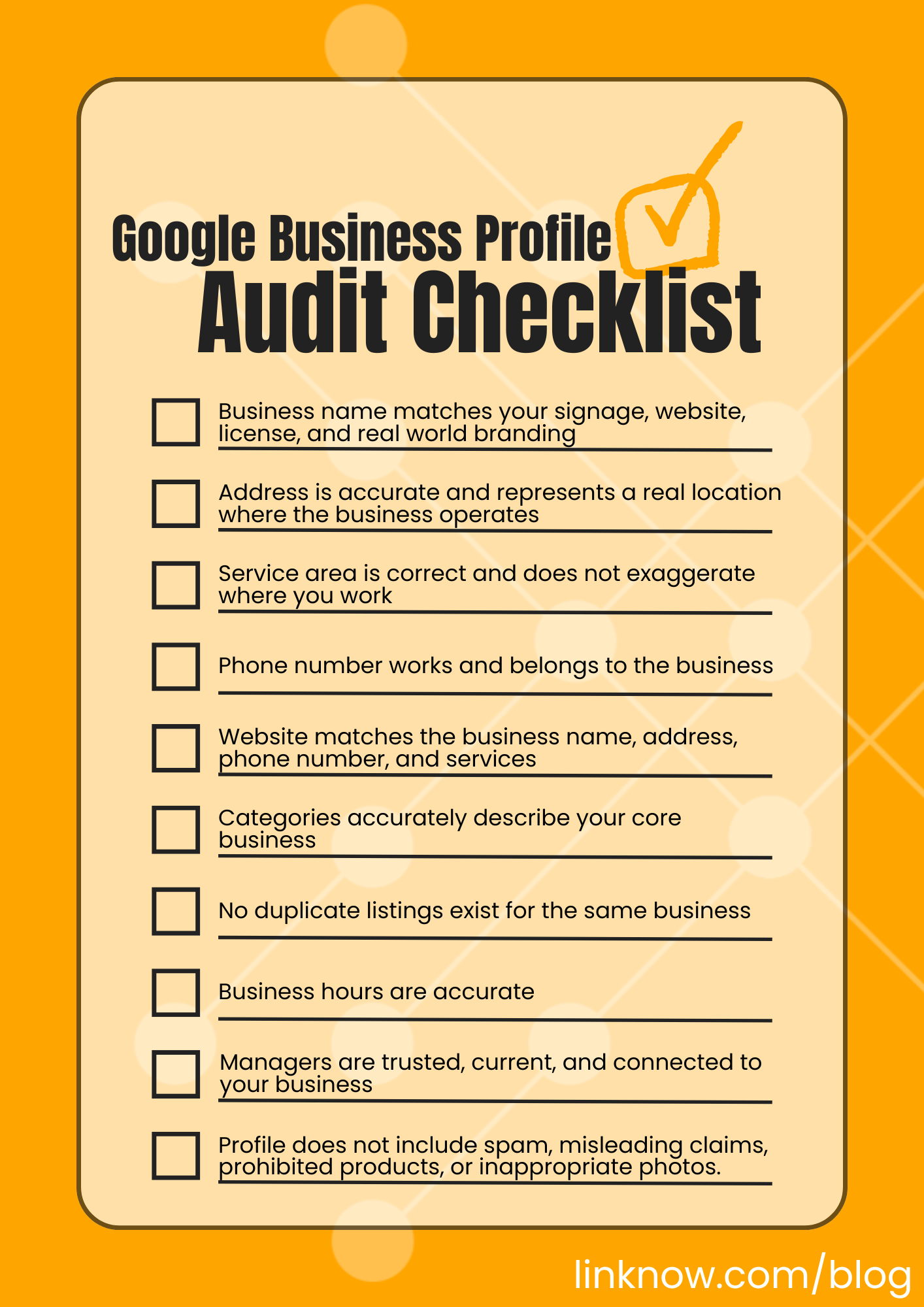
Before appealing, audit your profile carefully. The goal is to find anything that might make Google question whether your business is real, eligible, accurate, and trustworthy.
This step matters because many suspensions come from mismatched or questionable details. A business name with extra keywords, a hidden duplicate profile, an old address, or a website that uses different branding can all create trust issues.
Think of this review as preparing your case before speaking to Google. The cleaner and more consistent your profile looks, the easier it is to show that your business follows the rules.
Step 5: Gather Evidence and Submit Your Appeal
Once you have reviewed the issue, corrected anything that violates Google’s guidelines, and gathered proof, submit your appeal through Google’s official appeals tool.

Google’s process generally involves signing into the connected account, selecting the affected Business Profile, reviewing the restriction reason and policy link, and submitting the appeal. Google will then review your appeal and send a decision by email.
When submitting your appeal, keep your explanation clear and factual. Avoid anger, guesses, or long emotional messages. Google needs to understand why your business is eligible, why the profile follows the rules, and what evidence supports your case.
Helpful evidence may include:
- • Business registration
- • Business license
- • Tax certificate
- • Utility bill
- • Lease agreement
- • Storefront photos
- • Signage photos
- • Branded vehicle photos
- • Website contact page screenshot
Make sure the business name and address on your documents match your Business Profile. If your proof tells a different story from your listing, the appeal may be weaker.
After submitting, wait for Google’s decision. Google says it may take up to 5 business days to review an appeal, and it advises users not to submit multiple appeals for the same issue before receiving a decision.
Suspended vs. Disabled: What’s the Difference?
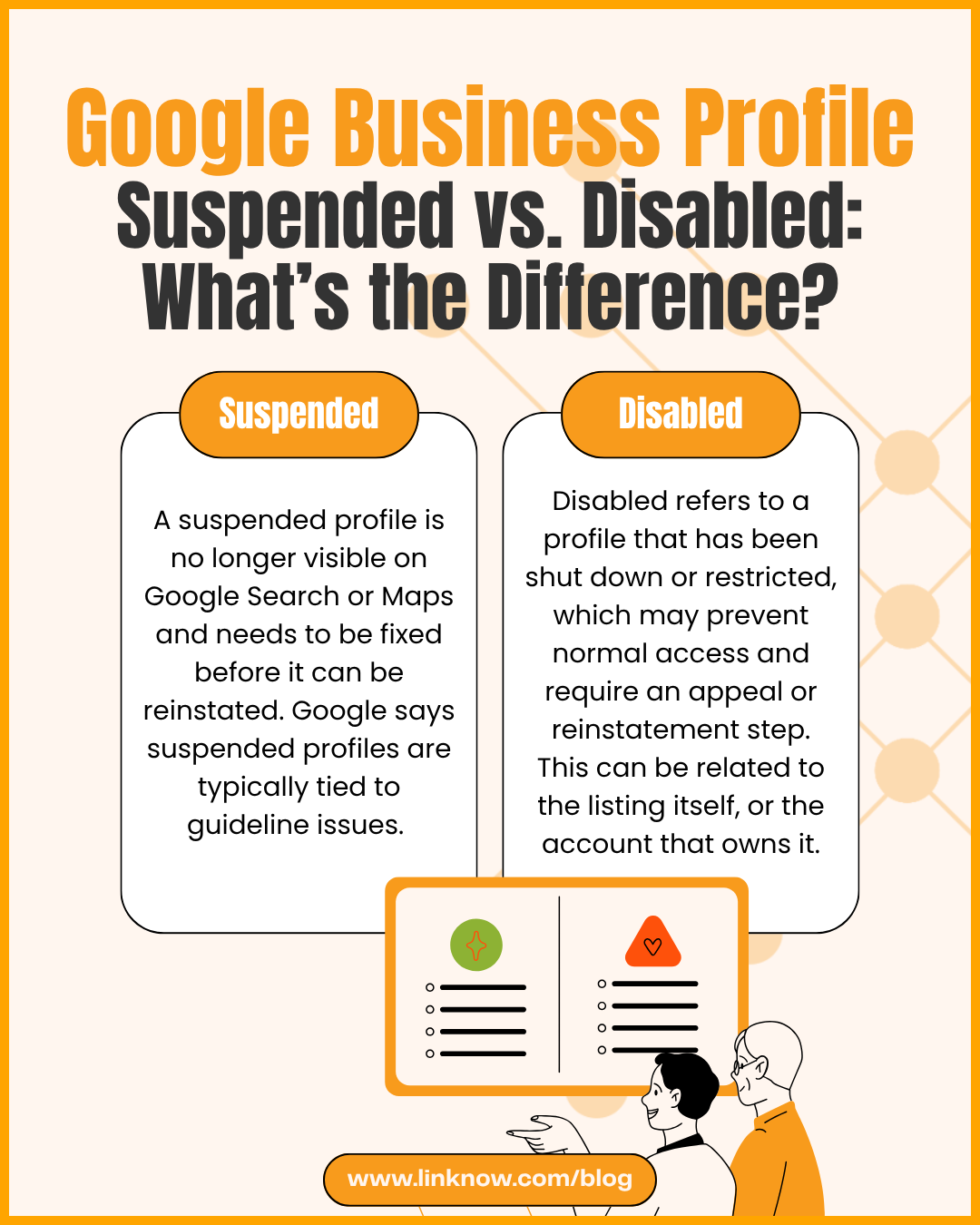
Google often discusses suspended and disabled Business Profiles together because both statuses mean the profile has run into a policy or eligibility problem. In either case, Google may restrict the profile because it believes the listing doesn’t follow Business Profile guidelines. For business owners, the difference is less about the label and more about what Google is allowing you to do next.
Like we’ve already discussed, a suspended Google Business Profile usually means Google has restricted the profile because something about it may violate Google’s guidelines. In plain English, a suspension means Google is saying: “We are not fully confident this profile follows our rules, so we are limiting it until the issue is reviewed.”
A disabled Google Business Profile means Google has taken action that limits or removes the profile because of a policy issue. A disabled profile can feel more severe because it may no longer function as expected. You may not be able to manage it normally, customers may not be able to find it, or Google may prevent certain profile content from showing.
Put simply, a disabled profile means Google is saying: “This profile or its content cannot continue operating as-is because it appears to violate our rules.”
Whichever problem you run into, your next move should be the same: review Google’s guidelines, correct inaccurate or misleading information, collect business proof, and submit a careful appeal through Google’s official process.
Special Cases Small Business Owners Should Know
Some Google Business Profile suspensions are straightforward. Others are messier because the business doesn’t fit neatly into a traditional business model.
Here are a few special cases where small business owners should pay extra attention:
Service-Area Businesses
Service-area businesses often face more confusion because they usually work at customer locations instead of serving customers at a public storefront.
Common examples include:
- • Plumbers
- • Roofers
- • Landscapers
- • Mobile mechanics
- • House cleaners
- • Electricians
- • HVAC contractors
- • Pest control companies
- • Locksmiths
- • Mobile pet groomers
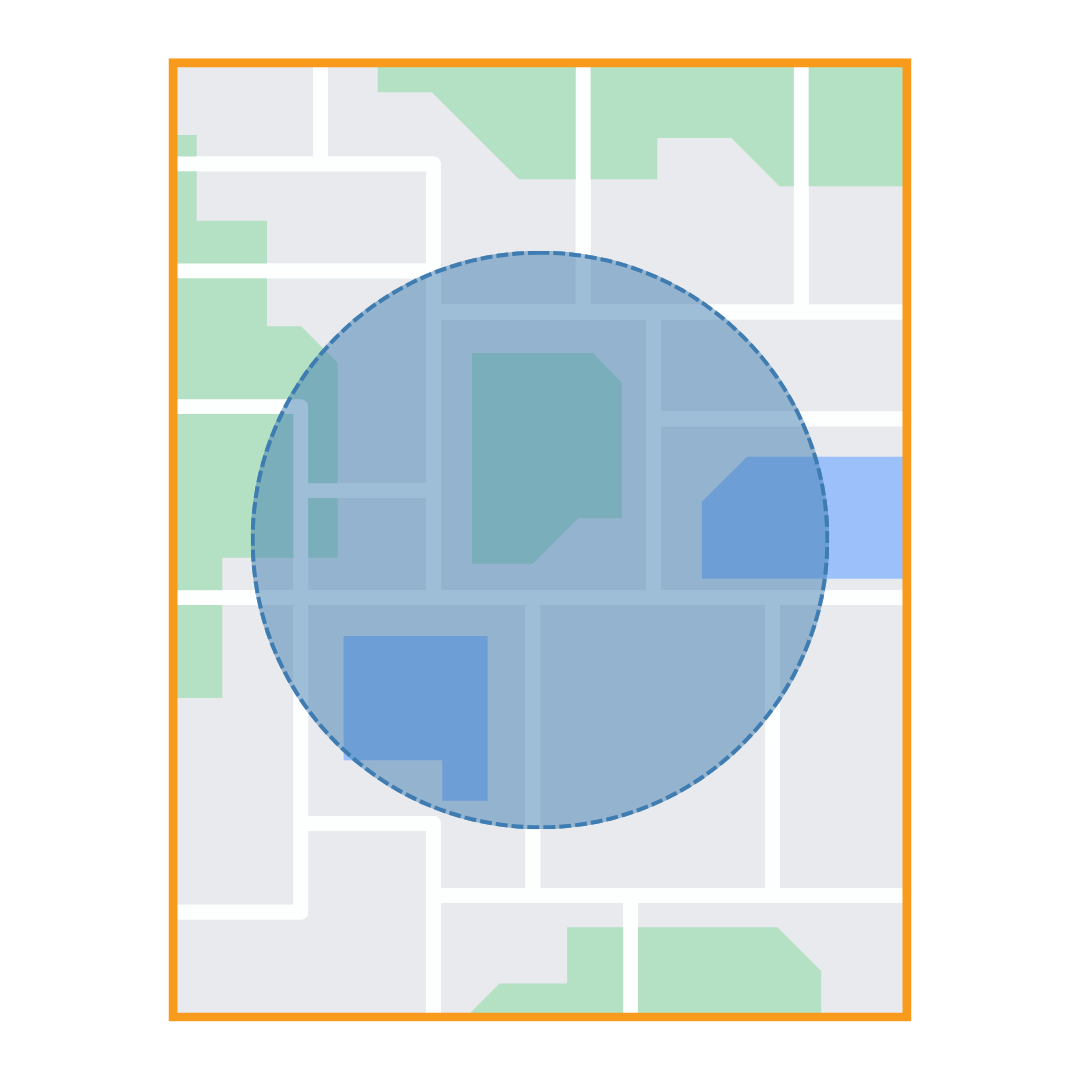
Google defines a service-area business as a business that visits or delivers to customers directly but doesn’t serve customers at its business address. Google also says service-area businesses can only have one profile for the whole area they serve.
For these businesses, the biggest question is usually: “Should my address be visible?”
If customers do not visit your business address, Google says you should remove the address from your Business Profile and only enter your service area.
That means a plumber working from a home office should usually hide their home address and set service areas instead. A roofer who has an office for staff but doesn’t receive customers there should also use a service-area setup. On the other hand, a showroom, shop, or office that customers can visit during business hours may qualify to show its address.
Home-Based Businesses
Home-based businesses can qualify for a Google Business Profile, but the profile needs to reflect how the business actually operates.
A home-based business may be eligible if it either serves customers at the home location or travels to customers. Google’s service-area guidance explains that businesses can use a service area when they visit or deliver to customers directly, and businesses that do not serve customers at their address should remove that address from the profile.
For example, a home-based massage therapist who welcomes clients to a dedicated studio may have a different setup than a house cleaner who travels to customers. A consultant who only works online may have a different eligibility issue altogether.
Don’t show a residential address just because it feels like Google “needs” an address. Don’t list a home as a storefront if customers cannot visit during stated hours. Don’t use a friend’s address, an employee’s address, or a random mailing address to rank in another city.
A home-based profile should be honest about how customers interact with the business. If you travel to customers, use service areas. If customers come to you, make sure the location is legitimate, has proper signage, and is staffed during posted hours.
Multi-Location Businesses
Multi-location businesses need to be especially careful because each location has to stand on its own.
In most cases, each Google Business Profile should represent a real, eligible location. That means each location should have a legitimate address, accurate contact information, appropriate signage or branding, and staff available during listed hours.
What you want to avoid is creating locations that only exist for SEO purposes.
Risky multi-location setups include:
- • Creating profiles for cities where you don’t have a real location
- • Using virtual offices as location pages
- • Listing employee homes as separate branches
- • Creating multiple profiles for the same business at the same address
- • Creating separate profiles for individual services instead of actual locations
Google’s guidance for service-area businesses also matters here because service-area businesses can only have one profile for the whole area they serve.
For businesses with multiple legitimate locations, consistency matters. Keep your business name format the same across locations unless there is a real-world reason it differs. Use accurate local phone numbers where possible. Create helpful local landing pages on your website so each profile points to a page that matches the location.
For example, a company with offices in Austin, Dallas, and Houston may have separate profiles if each office is real. Each profile should point to the correct location page, show accurate hours, and use the same real-world business name.
Rebrands, Moves, and Ownership Changes
Major business changes can also lead to extra scrutiny.
A rebrand, move, phone number change, website change, or ownership transfer may be completely legitimate. Businesses grow, relocate, merge, and change direction. Still, these updates can affect how much Google trusts the profile, especially if several details change at once.
Examples of major changes include:
- • Changing the business name
- • Moving to a new address
- • Updating the primary phone number
- • Switching website domains
- • Changing the primary category
- • Transferring ownership
- • Turning a storefront into a service-area business
- • Turning a service-area business into a storefront or hybrid business
Before making major profile changes, update your website first. Your website should clearly show the new name, address, phone number, service areas, and business details. Then, make sure your business documents, signage, invoices, licenses, and other proof support the change.
A Google Business Profile should tell the same story as your actual business. The more clearly your profile matches your real-world operations, the easier it is for Google and customers to trust it.
Google Suspension Frequently Asked Questions
Will I Lose Reviews if My Profile Is Suspended?
In most reinstatement cases, reviews return when the original profile is restored. This is one of the biggest reasons not to delete your suspended profile or create a replacement too quickly. Your original profile may have years of reviews, photos, customer history, and local trust attached to it. Starting over can put that value at risk.
Instead of trying to replace the profile, focus on fixing the original listing, gathering evidence, and using Google’s appeal process.
Can Competitors Get My Profile Suspended?
Competitors can suggest edits, report listings, or flag content, but they don’t get the final say. Google decides whether to take action.
That said, competitor reports can draw attention to a profile that already has weak spots. If your Business Profile is already violating Google’s guidelines, it may be easier to challenge. The best defense is a clean, accurate, well-documented Google Business Profile.
How Long Does Reinstatement Take?
Google says appeal reviews and decisions can take up to 5 business days. Google also advises business owners not to submit multiple appeals for the same issue before receiving a decision.
Complicated cases may take longer, especially if Google needs to review documents, verify business eligibility, or evaluate account-level issues. After submitting an appeal, watch your email and check the appeals tool for status updates.
What Happens if My Appeal Is Denied?
A denied appeal doesn’t always mean the process is over. Google says that if your request is denied, you may be able to request an additional review. This is your chance to provide evidence that was not included with the original appeal.
Use the denial as a signal to improve your documentation and correct any remaining profile issues.
Can an Agency Appeal for Me?
Yes, an agency can help appeal a suspended Google Business Profile if it has proper access to the listing and understands Google’s guidelines.
However, the strongest evidence usually comes from official business records. An agency may be able to manage the process, review the profile, organize documentation, and write a clear appeal explanation, but Google may still need proof that the business is eligible and accurately represented.
Get the Support You Need With a Suspended Google Business Profile
A Google Business Profile suspension can feel overwhelming, especially when your business depends on local visibility. Still, the best response isn’t panic—it’s preparation.
Google wants Business Profiles to represent real businesses clearly and accurately. When those details line up, your profile is easier for Google to trust and easier for customers to understand.
If your profile is suspended, take the process seriously. Treating it like a real business asset can help you recover from problems faster and reduce the risk of future suspensions.
LinkNow is proud to offer Google suspension support to our SEO clients. If you are experiencing any issues or would like to speak with our team, you can reach us at 1.888.667.7186 or website@linknowmedia.com.