
Yes! I'd like to be contacted to schedule a consultation!
You have about three seconds to make a strong first impression. Sometimes less. Why do users choose to leave an HVAC website in those three seconds? It mostly comes down to technical issues, like slow loading times, insecure connections, or confusing layouts.
Consider an HVAC site that’s optimized with HTTPS. Visitors can recognize the “https://” in the browser bar, a proxy for secure data encryption. Fast load times also mean users don’t abandon the page out of frustration, while mobile optimization lets them view service information easily from any device.
These technical SEO refinements translate into tangible benefits for HVAC businesses: higher search rankings, improved user engagement, and better conversion rates. LinkNow’s team will break down the essential technical SEO elements that can help your HVAC website connect with customers more effectively.
We've already mentioned a few of the reasons why technical SEO matters. Essentially, it’s about creating a positive user experience (UX) that ensures your customers can find and engage with your services quickly and securely. You don’t want to give your potential clients a reason to bounce.
Technical SEO supports higher search engine rankings, making your HVAC site more visible to local customers in need of the fast, dependable service you provide. When you optimize aspects like site speed and mobile usability especially, your website performs better and conforms to the standards of customers who want things immediately.
Technical SEO, on-page SEO, and off-page SEO are distinct but not unrelated. While technical SEO focuses on your website's underlying structure and performance, on-page SEO involves optimizing content and keywords within your site, and off-page SEO involves building your site’s authority through backlinks and external signals. Together, they form a complete strategy.
Let’s say your technical SEO is fully optimized, but your landing pages don’t have strong keywords, and you have no active social media accounts. In this case, no potential user can enjoy the benefits of your optimized site because they’re less likely to find it in the first place.
A complete strategy is necessary, as it leads to:
Technical SEO can get quite technical, but don’t worry about mastering every detail right away. First, let’s consider two key elements: structured data markup and an XML sitemap.
Structured data markup helps search engines recognize specific information about your HVAC services, like installation, repair, and maintenance. This enables your site to show rich snippets in search results, allowing potential customers to see service highlights, hours, or customer ratings.
Without Rich Snippets:
Cool Comfort HVAC Services
Providing heating, cooling, and ventilation services in Springfield. Contact us today!
www.fakehvaccompany.com
With Rich Snippets:
Cool Comfort HVAC Services
⭐ 4.8 (125 reviews)
Providing expert heating, cooling, and ventilation services for homes and businesses in Springfield.
📍 123 Main Street, Springfield, IL | 📞 +1-800-555-1234 | 🕒 Mon-Fri 8 AM - 5 PM
www.fakehvaccompany.com
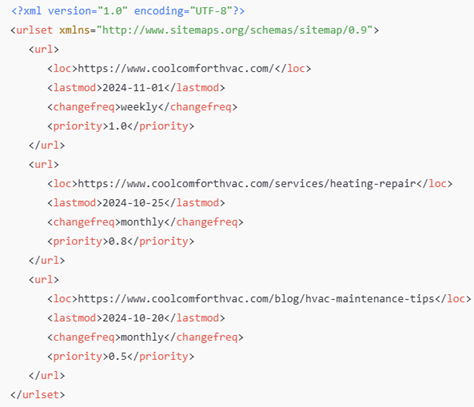
As an HVAC company, having an XML sitemap also ensures that key service pages, seasonal offers, and local information are easily accessible online. It’s a file that lists all the important pages on your website, written in XML (Extensible Markup Language).
Here’s what it looks like:
Here are a few other examples of technical SEO elements your HVAC site needs:
More than half of website traffic comes from people using mobile devices, which means it’s essential for your HVAC service pages to be mobile-friendly. A mobile-optimized page lets users find details like service descriptions, contact information, and booking options without dealing with slow load times or awkward formatting.
To optimize for mobile, you need to prioritize a responsive design, which automatically adjusts the page layout for different screen sizes. This means users on smartphones and tablets can easily read text, tap buttons, and fill out forms without needing to zoom or scroll excessively.
Here are a few simple ways to optimize for mobile:
Users will leave a site that takes too long to load. It’s as simple as that. HVAC customers need quick access to information, especially during service emergencies. Slow-loading pages will lead to higher bounce rates, meaning potential customers leave before even considering what you have to offer. Intuitively, consumers often consider slow sites “sketchy” and kill the page immediately.
One way to improve site speed is by reducing HTTP requests. Every image, script, or style sheet requires an HTTP request, which can slow down the loading process. By minimizing these requests—such as combining CSS files or compressing images—you or your developers can streamline page loading times, creating a smoother and faster experience for HVAC customers.
Another effective way to increase site speed is by enabling browser caching. Caching allows a user’s browser to store certain elements of your website, like images or logos, so they don’t have to be reloaded each time the user visits a new page. For an HVAC site, this means that frequent visitors can navigate between pages quickly, as their browser already has key elements ready to go.
Here are a few common issues with quick solutions:
Issue: Pages with multiple redirects (e.g., Page A → Page B → Page C) slow down crawling and confuse users.
Solution: Simplify by pointing old pages directly to the final URL with a single redirect.
Issue: Key information, like HVAC services or locations, might be hidden in mobile view, impacting indexing and usability.
Solution: Test your site on various devices to ensure all essential content is visible.
Issue: Pages like specific promotions or blog posts that are not linked from other parts of the site can be hard for search engines to find.
Solution: Ensure every page is internally linked to at least one other relevant page.
Issue: Redirecting all location-specific searches (e.g., www.example.com/heating-boston) to a generic services page dilutes relevance.
Solution: Create tailored pages for specific cities or service areas with unique content.
Issue: Subdomains like blog.example.com or store.example.com might still load over HTTP, weakening security and rankings.
Solution: Apply SSL certificates to all subdomains and force HTTPS redirects across the entire site.
HTTPS (HyperText Transfer Protocol Secure) is a secure version of HTTP, the protocol used to transfer data between your website and a user’s browser. With HTTPS, data is encrypted, deterring hackers from intercepting sensitive information, like contact forms or payment details.
For your HVAC website, it also helps SEO. Search engines, like Google, prioritize HTTPS-enabled websites in search rankings because they provide a safer experience for users. If your site still uses HTTP, you might lose potential traffic to competitors who have secure hosting.
The robots.txt file tells search engines which pages or sections of your HVAC site to crawl and index and which to ignore. If it sounds a bit like a cheat code, by definition, it kind of is—a shortcut that directs search engines to spend their time and resources on high-priority pages.
This file follows "rules" that tell search engines exactly where they’re welcome to crawl and where they aren’t. These rules, defined by simple directives like "Allow" and "Disallow," give developers control over the sections of a site that appear in search results.
Canonical tags are HTML elements that help prevent duplicate content issues by telling search engines which version of a page is the “main” one. This is especially useful if your HVAC site has similar content across multiple pages, like different service areas with overlapping information.
You or your developer can use canonical tags by placing them in the page’s HTML head section and linking them to the preferred URL. This helps avoid confusion for search engines, which might otherwise see similar pages as duplicates and split their ranking power.
To use canonical tags, you’ll need to:
These tags are beneficial in situations where you either have duplicate pages or variations of the same page, e.g., www.example.com/hvac-services and www.example.com/hvac-services?ref=ad
The canonical tag goes in the <head> section of the HTML for the page. Here’s an example:

For example, if both https://www.example.com/hvac-services and https://www.example.com/hvac-services?ref=ad exist, place this in the <head> of both pages:

In WordPress, SEO plugins like Yoast or Rank Math allow you to set canonical URLs for each page. In custom CMS systems, you may need to manually add canonical tags in the HTML templates.
Crawlability refers to a search engine’s ability to navigate and “crawl” through your pages, following links and discovering new content. Indexability, on the other hand, is the process by which search engines decide which pages to include in search results after they’ve been crawled.
To enhance crawlability, you can use internal linking to connect key pages, helping search engines navigate your site more efficiently. For example, linking from your homepage to service pages like "AC Repair" or "Heating Installation" allows search engines to find and prioritize these pages easily.
Improving indexability can be done by ensuring that valuable pages aren’t blocked by your robots.txt file and using descriptive meta tags. Creating an XML sitemap is also beneficial—it provides a complete list of important pages on your HVAC site, guiding search engines to the content you want indexed.
Schema markup is a type of code you can add to your website to help search engines better understand the HVAC content on your pages. It can make specific details like services, locations, and contact information more visible in search results.
Question: Why does structured data even matter if search engines can already read my content?
While search engines can read content without schema, structured data provides additional context, helping search engines understand specific details like your business type, service areas, and hours of operation.
To get started with schema markup, focus on adding structured data for local businesses and specific services offered. Use the LocalBusiness schema (which provides detailed information about your business based on guidelines from Schema.org) and Service schemas (which describe the specific services your business provides as defined on Schema.org).
Here’s a step-by-step guide:
For HVAC companies, useful schema types include LocalBusiness, Service, and Product. Here’s a simple example using JSON-LD (JavaScript Object Notation for Linked Data), a recommended format by Google.
Example Schema Markup
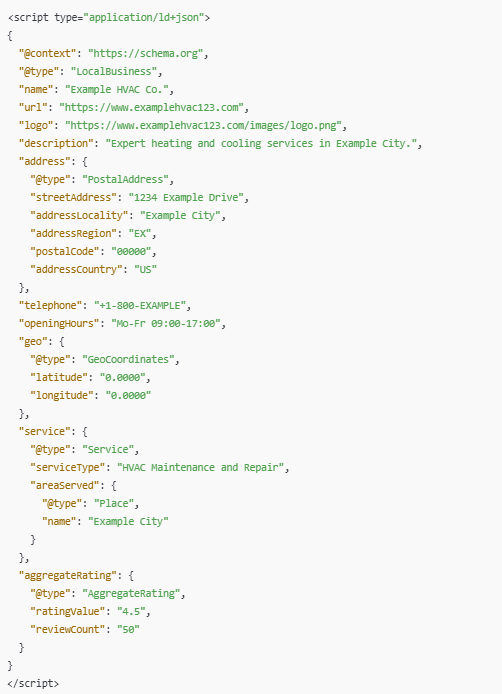
Add this code in the <head> section or right before the closing </body> tag of your web page’s HTML. You can include it on specific service pages, the home page, or your contact page, depending on what you want to highlight in search results.
Once the markup is added, test it using Google’s Rich Results Test tool to ensure it’s implemented correctly. When yours are optimized, this clarity can lead to enhanced search features, such as rich snippets or local pack visibility, making your HVAC services stand out.
URL structure refers to how web addresses (URLs) are organized on your HVAC website. A logical URL helps search engines understand the content of your pages and improves user navigation. For example, a URL like www.hvacsite.com/services/heating-repair clearly indicates the page’s topic. Both users and search engines won’t have any difficulty identifying relevant information.
Here’s what makes a URL structure SEO-friendly:
A well-optimized URL structure should include keywords that describe the content while avoiding unnecessary characters or long strings. For HVAC companies, this means using URLs that reflect your services and locations, such as www.randomhvacsite.com/cooling-installation/boston.
Consistency needs emphasis. If you, for example, use inconsistent formats like mixing underscores or varying capitalization, it can confuse readers and search engines. Pairing a logical URL structure with an effective sitemap helps search engines crawl your HVAC website.
Controlling or editing URL structure depends on the platform or content management system (CMS) you're using to build your website.
Here’s how to do it:
Determine whether your website is built using a content management system (CMS), a custom-coded framework, or a website builder. This will dictate where and how you edit URLs.
Locate the area in your website’s backend or codebase where URLs (or slugs) can be adjusted. In CMS platforms, this might be a "Page Settings" or "Permalinks" section. For custom websites, it could involve modifying code or server configuration files.
Decide on a logical structure for your URLs. An effective structure might look like this:
This ensures your URLs are clean, descriptive, and consistent.
Navigate to each page or post in your site editor or codebase. Replace generic or autogenerated URLs with concise, keyword-rich URLs.
Default: www.example.com/page123
Optimized: www.example.com/duct-cleaning
When changing an existing URL:
Set up a 301 redirect from the old URL to the new one. This will ensure users and search engines don’t encounter broken links and preserve search rankings.
After updating URLs:
Like local and on/off-page SEO, it’s important to track your technical SEO. Doing so will ensure your website remains optimized for search engines and user experience. Key metrics you should monitor include crawl errors, page load speed, mobile usability, and indexing status.
Google Search Console and Google Analytics can provide detailed insights. Google Search Console helps you monitor crawl errors, URL indexing, and structured data issues, while Google Analytics reveals user behavior, such as bounce rates and time on page, which can indicate technical problems.
Another metric you should be tracking is your website’s Core Web Vitals, which measure page performance, such as load times, interactivity, and visual stability. These are accessible in Google Search Console or through tools like PageSpeed Insights. These tools can recommend thresholds that improve rankings and user satisfaction.
Also, consider using tools like Screaming Frog or Sitebulb, which can help you identify orphaned pages (pages with no internal links) and ensure a logical link hierarchy that aids search engines in crawling your site effectively.
Technical SEO is often more difficult to manage than on-page or local SEO; using the wrong URL structure, for instance, can prevent search engines from properly indexing your site. It’s more than just adding keywords—technical SEO ensures your website is accessible, fast, and error-free.
At LinkNow Media, we can optimize all aspects of your site’s SEO to ensure that search engines can find and rank your content effectively to connect consumers with your HVAC services. Get in touch!